Blue Team Homelab · Part 00
Why Run a SOC at Home
What a security operations practice actually is, why you'd build one in a homelab, and the five disciplines this series walks through.
Security operations is one of those disciplines that looks impossibly large from the outside — war rooms, SIEM consoles, threat analysts staring at dashboards at 3 AM. What a Security Operations Center actually does, stripped of the enterprise theatre, is pretty simple: collect signals, watch for bad things, and respond when you find them. That’s the whole job.
For a homelab of one, the scope collapses considerably. You’re not staffing shifts. You’re not managing a SLA for mean-time-to-detect. You’re building the same mental models and the same muscle memory that blue team practitioners use at work — just on infrastructure you own, with telemetry from services you control, in a lab where breaking things costs you nothing but time. That’s the value. The reps are real even when the stakes are low.
This is the opening post for a new series. The beginner series got you a hardened VM and a working homelab. This series gets you a security practice built on top of it.
What “SOC” actually means when it’s just you
In an enterprise, a SOC is a people-process-technology operation: analysts triaging alerts, incident responders jumping on confirmed threats, engineers tuning detections, intelligence teams tracking adversaries, and a SIEM stitching the telemetry together. The technology is expensive. The headcount is substantial.
At home, you have none of that. What you have is:
- Technology: the same open-source tools the industry builds on — Elasticsearch or Loki for log aggregation, Grafana or Kibana for visualization, Zeek or Suricata for network visibility, Sigma rules for detection logic
- Process: a habit of actually looking at your logs, and a consistent way of recording what you find
- People: you, wearing all the hats
The hat-switching is actually useful. When you’re writing a detection, you’re doing detection engineering. When you’re looking for something that hasn’t triggered an alert yet, you’re threat hunting. When you’re figuring out what a piece of malware does so you know what to look for, you’re doing threat intelligence. Doing all of these yourself — even at small scale — gives you a systems view of how the disciplines depend on each other that’s hard to get any other way.
Why bother
The honest answer is that it builds real skills on real telemetry.
When you tune a Sigma rule against your own logs and it produces three false positives, you understand false positives in a way you don’t when it’s someone else’s lab data. When you catch a misconfigured service broadcasting on a port it shouldn’t be, you’ve just done your first detection. When you trace an authentication failure back to a device you forgot was still configured to talk to a service you decommissioned, you’ve done your first incident investigation. These are not toy exercises. The data is live, the infrastructure is real, and the analysis is yours.
You also genuinely will find things. Not nation-state intrusions — that’s not the threat you’re defending against. But commodity nastiness is everywhere. Bots scanning for exposed services, credential stuffing attempts on anything you’ve accidentally left internet-accessible, malware on a device on your network that you didn’t know was there. A security practice that’s functional — even a simple one — catches that class of problem. The reps happen to have real payoffs.
Right-size your threat model.
Home networks face real threats, but not all threats equally. The realistic home threat model is: commodity malware from a phished device, exposed or misconfigured services you forgot about, credential reuse from a breach somewhere else, and noisy IoT devices that shouldn’t be talking to the internet but are.
What it is not: a determined nation-state adversary, a targeted corporate espionage operation, or the CISA advisory threat-of-the-month. Not because those don’t exist, but because they’re not targeting your homelab. If you build your home security practice around the wrong threat model, you’ll either exhaust yourself chasing phantoms or waste time on controls that don’t match what’s actually in your environment.
Build for commodity threats. Get good reps. The skills transfer to defending against the sophisticated stuff — but the sophisticated stuff isn’t the thing that’s going to cause you a bad night at home.
The five disciplines this series covers
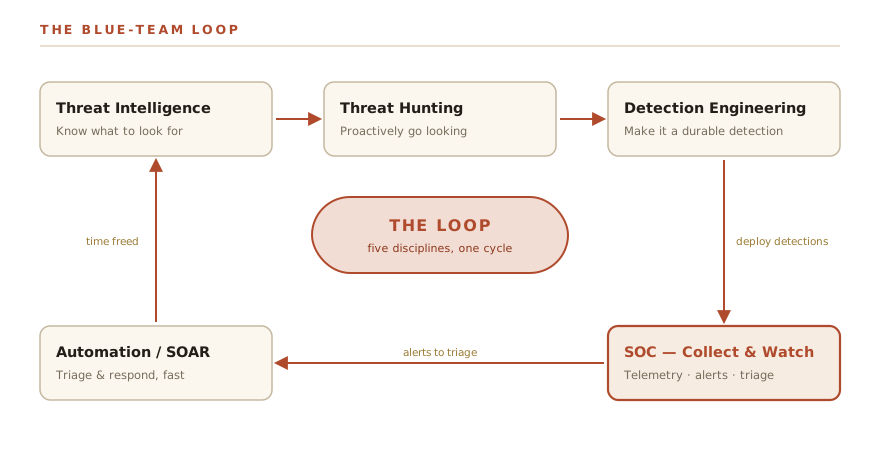
These aren’t five separate fields. They’re a loop. Each one feeds the others, and the loop is what makes a security practice work over time rather than just being a pile of tools.
SOC — collect and watch. This is the foundation: getting logs from your services and devices into one place, and having dashboards and alerts that surface anomalies. Without this layer, everything else is guessing. We’ll build a lightweight but functional log aggregation setup that gives you actual visibility into what’s happening on your network.
Threat Hunting — proactively look with no alert. Alerts catch what your detections are tuned to find. Threat hunting is the discipline of going looking for things that haven’t triggered anything yet — following a hypothesis (“do I have any hosts talking to IP ranges I don’t recognize?”) and investigating until you have an answer. It’s the proactive complement to reactive alerting, and it’s where experienced practitioners find the stuff that slips through.
Threat Intelligence — know what to look for. Intelligence is context: who is attacking what, with which techniques, and leaving which artifacts. At the homelab level, this means consuming free intelligence feeds (abuse.ch, MISP communities, CISA KEV) and using that context to prioritize what you’re watching for. It’s the input that makes detection engineering less of a guessing game.
Detection Engineering — turn knowledge into durable, tested detections. Once you know what to look for, you write detections — rules that fire when that thing shows up. The “engineering” part matters: detections should be tested against known-good and known-bad data, versioned, and maintained like code. A detection that produces too many false positives gets ignored. One that’s never been tested against a real example of the threat it claims to catch isn’t a detection, it’s a wish.
Automation / SOAR — let machines do the boring response. Security Orchestration, Automation, and Response sounds fancy. At home it means: when an alert fires, the obvious first response steps happen automatically, and the alert you receive already has the context you need to decide what to do next. Enrichment lookups, automatic isolation of known-bad IPs, ticket creation, Telegram notifications with the relevant log snippet attached — all of this is automatable, and automating it means you spend your time on decisions, not on running the same lookup for the fifth time.
The loop looks like this: telemetry from your SOC layer informs threat hunting; hunting discoveries become intelligence; intelligence shapes detection engineering; detections feed back into the SOC layer; automation handles the response so you’re only interrupted when human judgment is actually required. Run the loop long enough and your practice gets tighter with every iteration.
What you need to follow along
You need a working, hardened homelab VM. That’s it for prerequisites.
If you don’t have one yet, the beginner series covers it: Getting the VM ready and Securing the Box get you to a solid baseline. If you’ve already been through that series, the starter projects post is a useful on-ramp — specifically Project 5, monitoring and alerts. Having even a minimal log aggregation setup already running means the first post in this series has something to build on.
The tools we’ll use are open-source and chosen because they’re what practitioners actually use — not because they’re the easiest to install or the most beginner-friendly. There’s a learning curve in places. That’s part of the point.
Next Up
The first technical post: SOC Architecture for a Homelab of One — what to collect, where to store it, and how to build a logging pipeline that’s actually useful without eating your weekend every time you need to maintain it.