Blue Team Homelab · Part 03
Threat Intelligence That Isn't Just a Feed
Intelligence is a process, not a list of bad IPs. The intel lifecycle, strategic/operational/tactical levels, IOCs vs TTPs, and running MISP or OpenCTI at home.
The most common misunderstanding about threat intelligence is baked into the name people use for it. “Subscribe to a threat feed” is how most people phrase it. Subscribe. As if intelligence is something you receive passively, like a newsletter, and the receiving is the point.
It isn’t. Intelligence is a process that produces decisions. The output isn’t a list of bad IP addresses — it’s an analyst saying “based on what I know about this adversary’s behaviour, we should be watching for X.” The feed is raw material at best. On its own, it’s noise with a confidence problem.
This distinction matters in a homelab context because it changes what you build and why. If you’re running MISP to ingest abuse.ch feeds and call it “threat intel,” you’ve built a fancy blocklist manager. Which is fine — but it’s not intelligence work. Intelligence starts when you start asking why and so what.
Let’s build that understanding from the ground up.
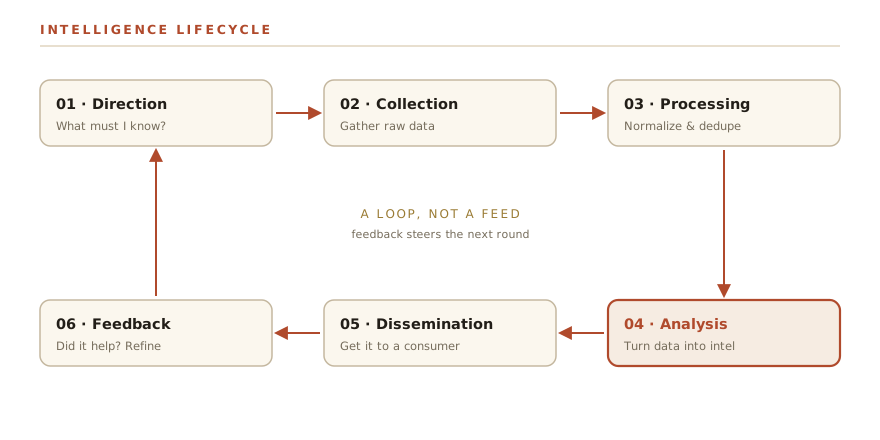
The Intelligence Lifecycle
The intelligence lifecycle is a six-phase loop. Every professional CTI program runs on it, whether or not they’ve named it that. At home you’re running a stripped-down version of the same thing.
Direction. Before you collect anything, you need to know what question you’re trying to answer. This is called the Priority Intelligence Requirement, or PIR, in formal programs. In homelab terms it sounds like: “I run self-hosted services on the internet. What threats are realistically targeting things like me?” That’s a PIR. It scopes everything downstream. Without it, you’re just downloading lists of malicious IPs and hoping.
Collection. Given your direction, you gather raw data from sources that might contain relevant information. Threat reports, feeds, open-source repositories, honeypot data, your own logs. Collection without direction produces data lakes. Collection against a specific question produces useful signal.
Processing. Raw data isn’t analysis-ready. You need to normalize formats (STIX/TAXII is a common standard, more on that in a moment), deduplicate, filter out things outside your scope, and structure it so a human — or a tool — can reason over it. This is often the least glamorous step and frequently the bottleneck. A lot of so-called “threat intel platforms” are really processing engines.
Analysis and Production. This is the actual intelligence work. You look at what you’ve collected and processed, find patterns, connect dots, and produce something a decision-maker can act on. “These indicators are associated with a phishing campaign targeting financial services orgs using this particular lure” is analysis. A list of 40,000 IPs is not.
Dissemination. Getting the product to whoever needs it. In a homelab this might be: updating your firewall rules, writing a hunt hypothesis to run in your SIEM, adding detection logic, or just noting in your notes file that a particular technique is active right now. The form follows the consumer.
Feedback. The loop closes here. Your consumers — which at home is mostly you — tell you what was useful, what wasn’t, and what questions remain unanswered. That feedback reshapes your next Direction cycle. This is the phase most people skip, and it’s why bad intel programs keep collecting things no one uses.
Strategic, Operational, Tactical
Not all intelligence serves the same purpose. The field divides it into three levels, and they’re consumed by different people for different reasons.
Strategic intelligence deals with long-term trends, geopolitics, and the “who and why” behind threats. Who are the major threat actors targeting this sector? What’s driving their motivation? What techniques are becoming more common over a multi-year timeframe? This level is consumed by executives and decision-makers. At home you’re engaging with strategic intel when you read a year-in-review threat landscape report and use it to decide whether to invest time hardening a particular service.
Operational intelligence sits in the middle. It describes active campaigns: how a specific adversary is operating right now, what infrastructure they’re using, what TTPs define their current activity. It answers “how are they doing it?” for a particular campaign. Analysts and threat hunters consume this level — it’s how you design hunts and detections that are relevant to what’s actually happening, not just theoretically possible.
Tactical intelligence is the atomic layer: indicators of compromise. Hashes, IP addresses, domains, file names, registry keys. Highly specific, highly actionable for automated systems, and highly perishable. An IP address that’s malicious today is often abandoned by next week. Your firewall and endpoint tools consume tactical intel.
The three levels form a pyramid in terms of durability. Tactical is the bottom — wide, abundant, and short-lived. Strategic is the apex — narrow, harder to produce, and it stays relevant for years.
IOCs vs TTPs — and Why It Matters
This connects directly to what we covered in Part 2 with the Pyramid of Pain. To recap: the Pyramid describes the cost an adversary pays when you detect and block at each level. Hash values at the bottom cost them nothing to change — one recompile. IP addresses, same story — spin up a new VPS. At the top of the pyramid are TTPs: the patterns of how they operate. Those are expensive to change because they’re baked into the adversary’s tooling, training, and habits.
The implication for intel work is the same: IOCs are perishable. A ThreatFox feed of malicious IPs is useful for blocking today’s infrastructure, but tomorrow that infrastructure may be gone and new IOCs will be different. A detection written against a TTP — say, PowerShell spawning from a parent process that shouldn’t spawn it — is durable. The adversary has to change their behavior, not just register a new domain.
This doesn’t mean IOC feeds are worthless. They block known-bad automatically and with low overhead. The mistake is treating them as intelligence rather than what they are: a low-level, high-volume, short-lived layer of defence.
If your intel work never rises above IOC collection, you’re defending against yesterday’s artifacts. The higher-value work is understanding the techniques in play and building detections that catch those techniques regardless of what infrastructure or tools the adversary uses.
The Diamond Model
When you’re analyzing a specific intrusion or campaign, the Diamond Model of Intrusion Analysis is a structured way to reason about what you know and what you can infer.
The model has four vertices:
Adversary — the threat actor. Who is conducting the activity? Their intent, motivation, and identity.
Capability — the tools, techniques, and malware they use. What they can do.
Infrastructure — the technical resources they use to operate: domains, IPs, C2 servers, email accounts. The “how they communicate with their tools” layer.
Victim — the target. Who is being attacked and what features make them a target.
The insight is that these vertices are connected — you can pivot from any one to learn about the others. You observe a piece of infrastructure (a C2 domain) and pivot to: what other domains use the same registrar and registration pattern? That might expand your infrastructure picture. You see a capability (a particular malware family) and pivot to: what adversaries are known to use this? That connects to the adversary vertex.
In practice, most homelab analysts are working from the infrastructure and capability vertices — those are what show up in open-source feeds. The Diamond Model gives you a mental scaffold for asking “what else can I learn from this?” rather than just adding an IOC to a list and moving on.
MITRE ATT&CK as the Shared Language
ATT&CK is the framework that connects intel work to detection engineering, which is Part 4. At its core it’s a structured catalog of adversary TTPs — organized by tactic (the goal: initial access, execution, persistence, etc.) and technique (the specific method: spearphishing attachment, PowerShell, scheduled task, etc.).
Its value in an intel context is that it gives you a common vocabulary. When a threat report says an adversary uses “T1059.001 — Command and Scripting Interpreter: PowerShell,” that’s a precise, standardized claim that you can immediately map to a detection engineering question: “Do I have coverage for that technique?” If you’re consuming intel from multiple sources in different formats, ATT&CK IDs give you a way to normalize and compare across them.
The practical workflow: when you read a threat report or process a feed that includes technique information, map it to ATT&CK. That mapping becomes the bridge to Part 4 — it turns intel into a detection requirement. “This campaign uses T1566.001 (spearphishing with an attachment) for initial access and T1059.001 (PowerShell) for execution” tells you exactly what techniques to build coverage for.
Free Sources Worth Your Time
You don’t need paid subscriptions to do meaningful intel work at home. These sources are realistic for a homelab.
| Source | What it gives you | Level |
|---|---|---|
| abuse.ch (URLhaus / Feodo Tracker / ThreatFox) | Active malware URLs, C2 IPs, IOC submissions from the community | Tactical |
| AlienVault OTX | Community-curated threat pulses with IOCs + context, some ATT&CK mapping | Tactical / Operational |
| CISA KEV Catalog | Known exploited vulnerabilities — authoritative, updated frequently | Operational |
| MITRE ATT&CK | The technique library; adversary group profiles; detection guidance | Operational / Strategic |
| Vendor threat reports (Mandiant, CrowdStrike, Microsoft) | Annual/quarterly landscape analysis, named campaigns, TTP breakdowns | Strategic / Operational |
A note on vendor reports: they exist partly for marketing. The Mandiant M-Trends report is genuinely useful; the accompanying press release is less so. Read the primary report, not the summary blog post. The data on dwell time, initial access vectors, and industry targeting distributions is valuable and grounded in real incident response cases.
Tools: MISP and OpenCTI
Two open-source platforms dominate the homelab intel space.
MISP (Malware Information Sharing Platform) is a mature, battle-tested platform for managing IOCs and sharing them across organizations. At home you’d use it to ingest feeds from abuse.ch, OTX, and others; tag and correlate events; and export IOCs to your firewall or SIEM. The MISP community runs sharing communities (called “MISP communities”) where orgs exchange intel — some are publicly joinable.
The honest assessment: MISP is powerful and comprehensive. It’s also complex to operate, with a lot of surface area for configuration. The learning curve is real. If your goal is structured IOC management and you’re willing to invest time, it pays off. If you just want to block feeds, a simpler option exists (your firewall can pull threat feeds directly).
OpenCTI is a newer platform built around a STIX2 knowledge graph. Where MISP is strong on IOC management and sharing, OpenCTI is stronger on the knowledge graph side — it’s designed to represent relationships between entities: “this adversary used this malware, which connects to this campaign, which targeted this sector.” It integrates natively with MITRE ATT&CK. It’s also heavier to run — it uses Elasticsearch and several dependent services and wants several gigabytes of RAM.
Neither is a weekend setup. Both have Docker Compose deployments that simplify the initial install, but plan for a week of configuration, connector setup, and getting feeds flowing before anything feels solid. The payoff is a platform that actually does intelligence work rather than just blocklist management — but be honest with yourself about whether you have the time to operate it properly.
A Worked Example: Feed to Hunt to Detection
This is the loop that makes intel useful rather than decorative.
Start on ThreatFox. Pull a recent submission — let’s say it’s a Cobalt Strike C2 domain with associated IP and a BEACON tag. The submitter has also provided a JA3 hash for the TLS fingerprint.
Process: You have three IOCs (domain, IP, JA3 hash) and a malware family (Cobalt Strike Beacon). You map what you know: Cobalt Strike is a commercial pen-test tool heavily abused by ransomware operators and espionage groups. You look up Cobalt Strike in ATT&CK — it maps across multiple techniques, but the relevant ones for Beacon are T1071.001 (Application Layer Protocol: Web Protocols, for C2 over HTTP/S) and T1095 (Non-Application Layer Protocol, for DNS beaconing).
Enrich: OTX may have a pulse on this indicator with additional context — what campaign, what targeting. The CISA KEV catalog may have related vulnerabilities if this Beacon deployment is associated with known exploitation activity.
Decide — hunt hypothesis or detection:
Hunt hypothesis route (loops to Part 2): “Do I have any traffic to this domain or IP in my logs from the past 30 days? Do I have any TLS connections matching this JA3 signature? Are there hosts on my network making high-frequency, low-payload HTTP connections consistent with Beacon’s beacon interval?” You run those queries in your log data.
Detection route (sets up Part 4): The JA3 hash and the behavioral pattern of Beacon — periodic callback intervals, relatively uniform payload sizes — can be turned into detection rules. The domain and IP can be added to blocklists with a note about why. More durably: if you know Beacon typically uses named-pipe communication for lateral movement, that’s a behavioral detection that survives this specific campaign moving to new infrastructure.
This is the handoff. Intel produces a hypothesis or a detection requirement. It doesn’t sit in a list. It becomes work.
Intel with no consumer is a hobby.
Every piece of intelligence you produce should connect to one of three things: a hunt you’re going to run, a detection you’re going to build, or a decision you’re going to make. “We’re going to add memory to the watchlist and monitor for this technique for the next 30 days” is a decision. “Added to MISP” is filing. Filing is not intelligence work.
Before you ingest a new source, ask: what will I do differently because of information from this source? If you can’t answer that, the source is probably overhead you don’t need.
What You’re Actually Building Toward
Intelligence without detection is academic. Detection without intelligence is blind. Part 4 is where these two disciplines connect properly: we’ll take the ATT&CK techniques that intel work surfaces and turn them into actual detection rules — Sigma, log queries, behavioral signatures — that run against real data.
The work you do here — mapping IOCs to techniques, understanding adversary behaviour at the TTP level, building the habit of asking “what does this mean for what I should detect” — is the foundation that makes Part 4 useful rather than a recipe you’re copying without understanding.
Next Up
Detection Engineering: From Intel to Rules — taking what you’ve learned about adversary behaviour and turning it into detections that actually run.
Previous: Threat hunting: hypotheses, not alerts